










Use the free master prompt below to build your own Zoho CRM widget: a sales command center that runs inside your CRM. It is the trimmed, reusable version of the brief behind Sales Pulse, which we built with Claude. Our first version took one prompt and about 15 minutes of AI build time.
Replace everything in [brackets] before you run it. Results vary by AI model and change as Zoho updates its platform. Read the assumptions the AI lists, and test with a low-privilege user before you trust any number.
The full version, with seven views, a commission engine and design rules, is available on request.
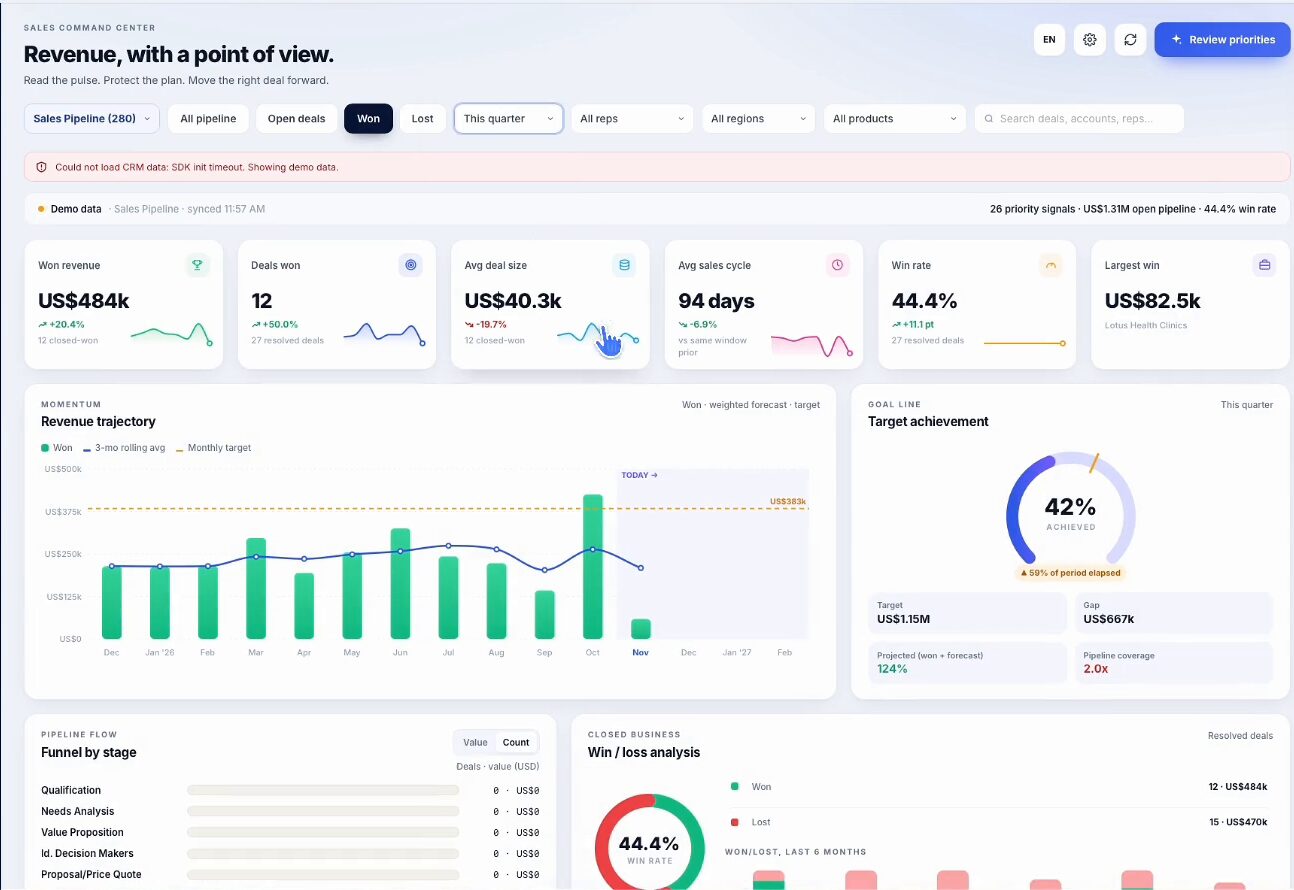
Table of Contents
Why build a Zoho CRM widget with AI?
Your CRM is already an app platform. A Zoho CRM widget runs inside it, so sign-in and your CRM account are already in place. When Zoho hosts the files, you do not set up a server. The AI mainly has to write the screen.
The Zoho Developer help describes the JavaScript SDK as working with data in the logged-in user’s context. Treat that as a strong starting point, not a security audit. Your widget code still needs review and a permission test.
We designed the Sales Pulse brief so a sales leader can answer three questions in under a minute:
- Where is the plan at risk?
- Who needs coaching?
- What should we do first this week?
Zoho CRM widget or Vibe: which path fits you?
Pick the widget if you want to own the code and fix the rules yourself. Try Vibe if you want a prompt-to-app builder inside the CRM. Zoho announced Vibe on 23 November 2026.
| Your situation | Path to try first | Check before you start |
|---|---|---|
| You need exact metric rules and portable code | Zoho CRM widget generated with Claude or another assistant | Widgets are documented for Professional, Enterprise and Ultimate |
| You want a working screen without handling files | Vibe | Enterprise, Ultimate, Zoho One Enterprise or CRM Plus |
| Your requirements are still unclear | Prototype the screen first, then freeze the rules in a widget prompt | Time to rebuild, because the two outputs are separate |
| A standard chart already answers the question | Built-in CRM reports and dashboards | No code to maintain |
Vibe is new, so check access in your own account. Zoho’s community announcement describes a phased rollout that starts with the US, IN and EU data centers. It also says the first release builds Tabs only and requires the Manage Extensibility permission. These details were checked on 26 November 2026.
What to prepare before you copy the prompt
- A Zoho CRM edition that supports widgets, with Developer Permissions enabled on your profile.
- The name of your main pipeline and your reporting currency.
- Clean deal data: stage, amount, probability and closing date. Our guide to preparing data before using a CRM covers the basics.
- A low-privilege test user.
- An AI assistant that can create files and a zip package.
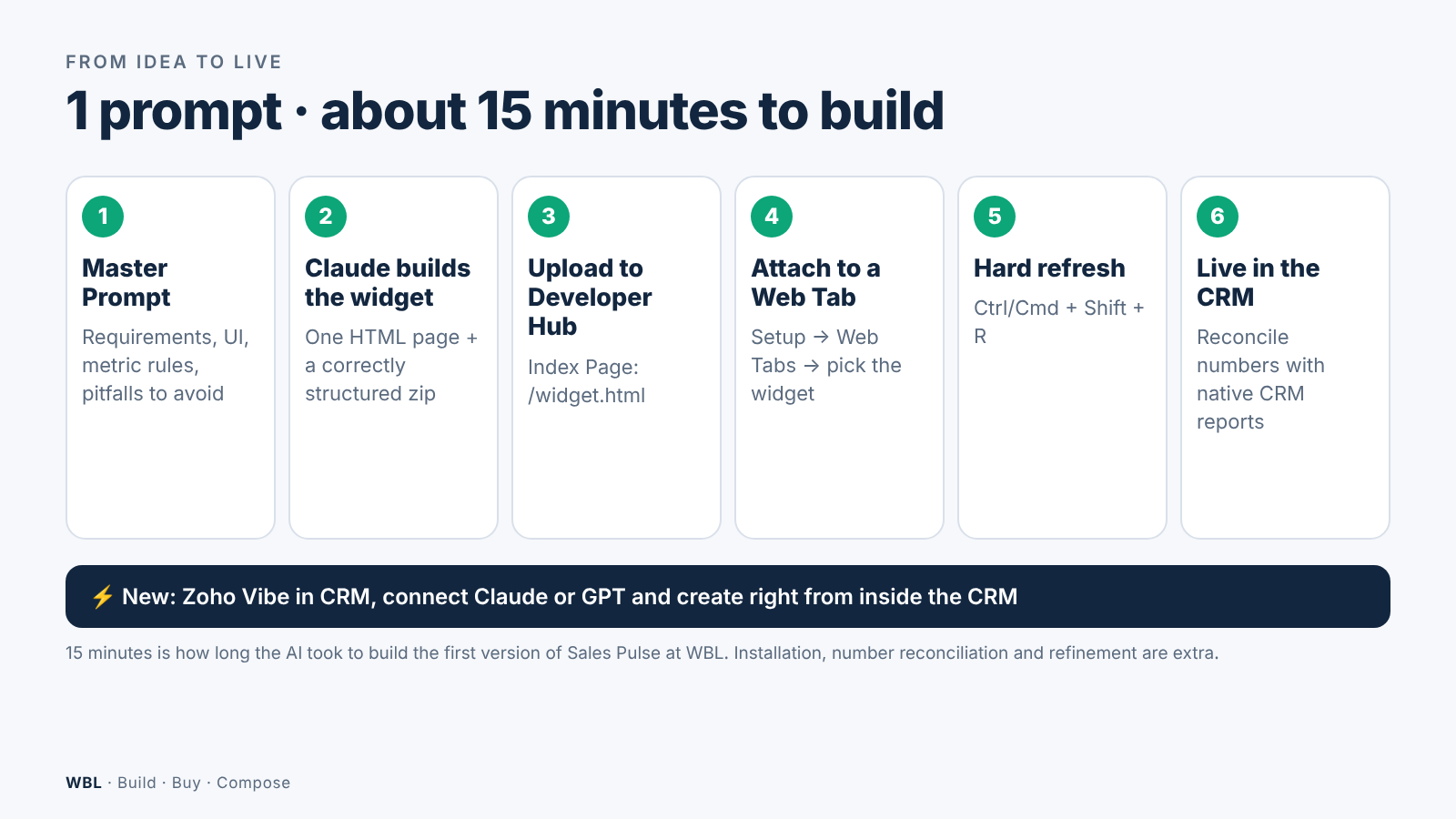
The 6-step loop for your Zoho CRM widget
The loop turns one prompt into a tool you can check. Do not skip step 5, because a good-looking chart can still be wrong.
- Frame. Fill every bracket with your edition, pipeline, currency and language.
- Plan. Read the short plan and the assumption list. Correct anything that does not match your CRM.
- Build. Let the AI create
widget.htmland the zip package. Ask to see the zip listing. - Install. Upload the zip in Developer Hub and attach the widget to a Web Tab.
- Verify. Reconcile the totals with standard CRM reports, using the same filters and dates.
- Refine. Report one problem at a time, rebuild, upload again and hard refresh.
Keep each version of the file. When a change breaks a metric, you can compare it with the last good build.
Metric rules that keep your Zoho CRM dashboard honest
Most dashboard disputes start with definitions, so write them into the prompt before the first build. These rules shape how a Zoho CRM widget counts your pipeline.
| Metric or case | Rule in the prompt | Why it matters |
|---|---|---|
| Deal status | Read forecast_type from the Stage picklist, never the stage name | Stage names differ by pipeline and team |
| On hold stages | Keep them Open and show them as a separate band | Stalled deals stay visible without changing CRM logic |
| Weighted forecast | Amount x Probability for Open deals only | Closed deals do not inflate the forecast |
| Missing amount | Count it as 0 and show a “Missing value” flag | Data gaps appear instead of disappearing |
| Period filter | Use Closing_Date | Every screen answers for the same period |
| Small samples | Label a comparison with fewer than 5 deals as low data | A large percentage on two deals misleads |
The full brief also sets rules for renewal dates and commission. Those depend on your sales policy, so agree on them with Finance before anyone builds them.
The master prompt: copy, edit and run
Paste this master prompt into your AI assistant to generate the Zoho CRM widget. This trimmed edition covers three views: Overview, Pipeline and Team.
# WBL Sales Pulse: Master Prompt (one prompt -> one Zoho CRM Widget)

## 0. ROLE AND GOAL
You are a senior Zoho CRM solution architect and front-end engineer.
Build "Sales Pulse": a sales command center that runs as a Zoho CRM Widget inside a Web Tab, reads CRM data through the official Zoho Embedded App JS SDK, and helps a sales leader answer three questions in under a minute: Where is the plan at risk? Who needs coaching? What should we do first this week?
Work in ONE pass. Do not ask me questions. If something is unclear, choose the most reasonable assumption, list every assumption in a comment block at the top of the file, and continue.

## 1. CONTEXT
- CRM: Zoho CRM ([EDITION, e.g. Zoho One / Enterprise]). Modules used: Deals, Accounts, Contacts, Notes, Users.
- Main pipeline: [PIPELINE NAME]. Stage picklist values are pipeline-specific: read them from field metadata, never hardcode.
- Currency: [USD]; secondary display [VND] at configurable rate [25900].
- Users: sales reps, sales managers, CEO. UI language: Vietnamese by default, English toggle (EN / VI) for every label.
- The widget must work in two modes: live (inside Zoho CRM) and demo (opened as a plain file, no SDK).

## 2. DELIVERABLES
1. widget.html: ONE self-contained file (inline CSS and JS). The only external dependency is the official Zoho Embedded App JS SDK (put its URL in a single constant at the top; use the URL from Zoho's current documentation).
2. sales-pulse-widget.zip built with a script, with this exact structure (do NOT use `zet pack`):
   - the same page at /widget.html, /index.html, /app/widget.html, /app/index.html
   - explicit directory entries in the zip
   - /plugin-manifest.json containing {"service":"CRM"}
   - /app/translations/en.json
3. After building, list the zip contents and verify the four page paths exist. Show the listing.
4. A short install guide (5 lines): Developer Hub -> Widgets -> upload zip -> Index Page /widget.html -> Setup -> Modules and Fields -> Web Tabs -> attach widget -> hard refresh (Ctrl/Cmd + Shift + R).

## 3. SCREENS (left navigation, 7 views)
1. Overview: filter bar (pipeline selector; All pipeline / Open / Won / Lost; period: this quarter, last quarter, this year, last year, last 6 months, all time; rep; region; product; search). KPI cards with sparkline and delta vs previous period: Won revenue, Deals won, Avg deal size, Avg sales cycle (days), Win rate, Largest win. Then: revenue trajectory (monthly won bars + 3-month rolling average + monthly target line), target achievement gauge (target, gap, projected = won + forecast, pipeline coverage), funnel by stage (value/count toggle), win/loss analysis (donut + top loss reasons), sales intelligence (3 signal cards + priority risk alerts), team leaderboard, sales heatmap (tabs: Region / Industry / Source / Deal type), product performance, highest-value accounts with industry mix.
2. Pipeline: funnel, 12-week close plan (weighted vs value), stage report table (deals, value, weighted, avg probability, avg age, overdue, inactive, no-amount, % of pipeline, largest deal), deal aging, deal list.
3. Accounts: account management console: relationship health (Critical / Watch / Steady), commitment or renewal date, open exposure, attention level (Urgent / Review), risk signal text; filters and sorting.
4. Customer 360: one account profile: info, deals, contacts, notes, related accounts. Click any item to open a detail drawer.
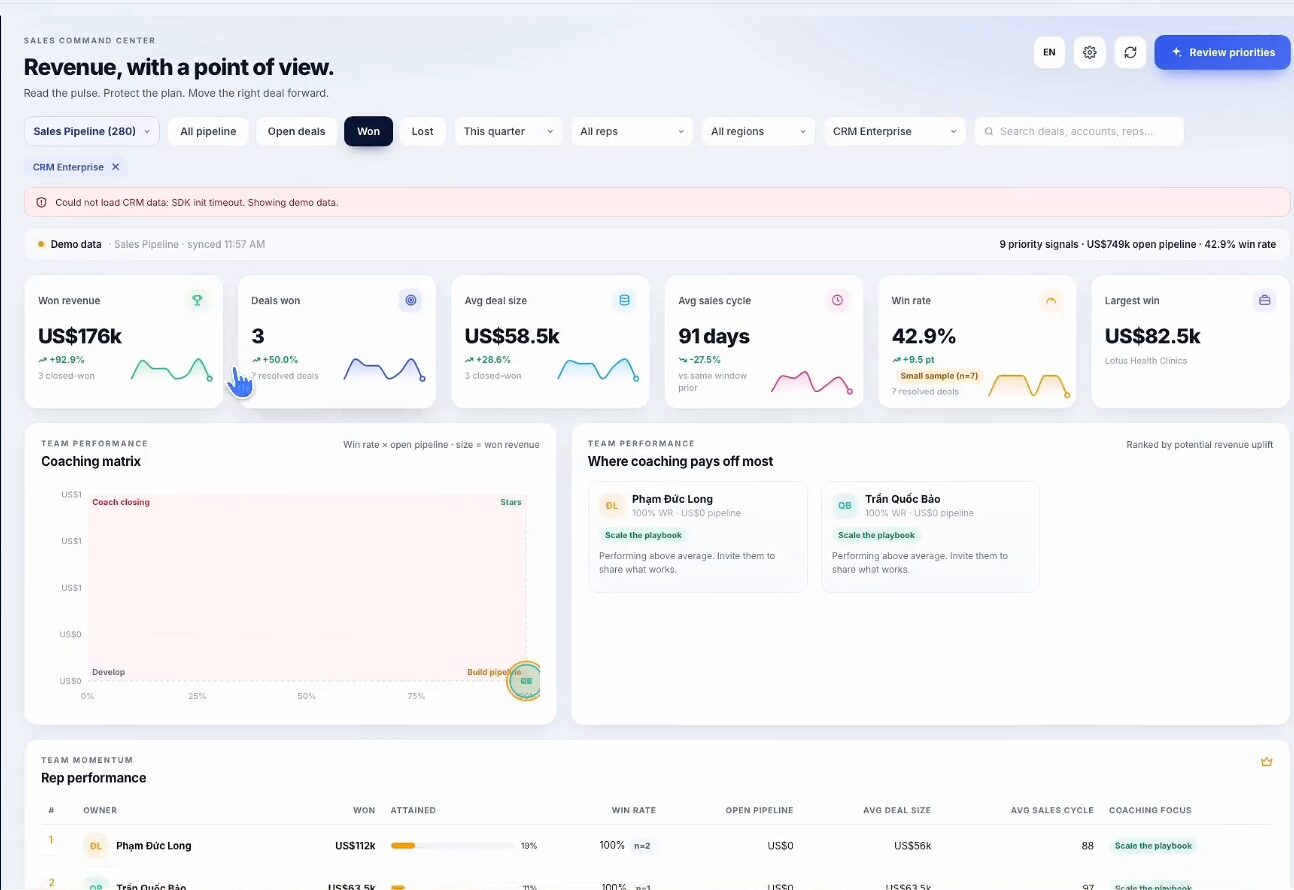
5. Team: coaching matrix (x = win rate, y = open pipeline, bubble size = won revenue; four zones: Stars, Coach closing, Build pipeline, Develop) and "where coaching pays off most" cards; rep performance table.
6. Commission: commission calculator per rep, daily pacing, month and quarter projection.
7. Intelligence: recommended actions, hot deals, risk alerts, all rule-based and explainable (show the rule that fired).
Every list row opens a right-side drawer with key fields, stage progress, a recommended next step, and two buttons: "Open in Zoho CRM" (deep link to the record) and "Customer 360".

## 4. METRIC RULES (must match Zoho CRM exactly)
- Deal status (Open / Won / Lost) comes from the forecast_type of the Stage picklist, matched on the display value that the record returns. Never infer status from stage names.
- A stage whose name contains "On hold" / "Tam hoan" is still Open (as in the CRM). Show it as a separate band. Config flag EXCLUDE_ON_HOLD_FROM_WEIGHTED (default false).
- Weighted forecast = Amount x Probability for Open deals. A deal with no Amount counts as 0 and gets a visible "Missing value" flag. Never hide it.
- Period filters use Closing_Date.
- A delta chip shows "low data in previous period" when the comparison period has fewer than 5 deals.
- Renewal date = most recent won close date + RENEWAL_MONTHS (default 12; 0 disables).
- Commission: tier rate by attainment level AFTER the deal; + size bonus (highest matching band); x deal-type multiplier x accelerator (attainment >= 120%) x personal multiplier; + one-time adjustment. USD thresholds converted at the configured rate. Put tiers, bands and multipliers in a CONFIG object at the top: [TIERS: e.g. <80% = 3%, 80-100% = 4%, >100% = 5%] [SIZE BONUSES] [DEAL-TYPE MULTIPLIERS].

## 5. DATA LAYER (the "one door" rule)
- Create ONE data-access module. No screen calls the SDK or API directly.
- It: initializes the SDK, reads stage metadata, pages through records, requests only the fields needed, caches in memory, normalizes records, and exposes clean functions to the screens.
- If SDK init does not respond within [6] seconds, switch to demo mode automatically and show a clear banner: "Could not load CRM data. Showing demo data."
- Demo mode: generate a realistic but entirely fictional dataset (about 300 deals, 35 accounts, 6 reps, 4 regions, 8 industries, 6 products, several lost reasons, some deals with missing Amount, some On hold, some overdue). Never use real company or person names.

## 6. DESIGN
- Calm, executive look: dark navy sidebar, light content area, white rounded cards, soft borders, generous spacing, one accent green for positive, red for risk, amber for watch.
- Typography: system sans-serif stack; large KPI numbers; small uppercase section labels.
- Charts: draw with inline SVG or canvas (no heavy chart library). Include tooltips, readable axis labels, and a legend whenever there is more than one series.
- Responsive down to a 1280px laptop; sticky filter bar; empty states and loading skeletons for every panel.
- Accessibility: color is never the only signal (add icons or text), contrast >= 4.5:1, keyboard-focusable drawer with Esc to close.

## 7. SECURITY AND QUALITY RULES
- Escape all record text before inserting into HTML. Never put raw CRM values into innerHTML.
- No API keys, tokens, passwords or credentials anywhere in the code.
- No network calls except the Zoho SDK. No eval. No storing customer data in browser storage.
- Handle: no deals, null Closing_Date, null Probability, missing owner, multi-currency, very long names, 10,000+ records (paginate, do not freeze the UI).

## 8. KNOWN PITFALLS (avoid them up front)
- "Page Not Found" after upload = wrong zip structure. Follow section 2 exactly.
- Stage values differ per pipeline: always read from metadata; match on display value.
- The widget may load before the SDK is ready: wait for the ready event, with the timeout fallback above.
- Do not compute dashboards from the first page of records only.
- After re-uploading, the Web Tab keeps the old widget until it is re-selected and the page is hard-refreshed.

## 9. HOW TO WORK
1. Output a 10-line plan: assumptions, field mapping, risks. Then continue immediately.
2. Build widget.html, then the zip with a Python script.
3. Self-review against sections 4, 5, 7, 8. Fix anything that fails, then state what you checked.
4. Finish with: the file paths, the zip listing, the install guide, and the list of assumptions I should confirm.
Fill in the brackets
| Placeholder | What to enter | Example |
|---|---|---|
| [EDITION] | Your CRM edition | Enterprise |
| [PIPELINE NAME] | Exact pipeline name shown in CRM | Standard |
| [CURRENCY] | Reporting currency | USD |
| [SECOND CURRENCY] and [EXCHANGE RATE] | Optional display currency and the rate Finance approves | VND and your approved rate |
| [DEFAULT LANGUAGE] and [SECOND LANGUAGE] | Interface languages | Vietnamese and English |
| [LOCAL ON-HOLD LABEL] | Your own wording for paused deals | Tạm hoãn |
| [TIMEOUT] | Seconds to wait before demo mode | 6 |
If a line does not apply, delete it. An unused bracket invites the AI to guess.
How to install your Zoho CRM widget
Installing takes a few clicks once the zip structure is right. Menu names can differ slightly between accounts and editions.
- Open Setup, then Developer Hub, then Widgets. Create a widget with Zoho hosting.
- Upload
sales-pulse-widget.zipand set the Index Page to/widget.html. - Go to Setup, then Modules and Fields, then Web Tabs.
- Create a Web Tab, attach the widget and check which users can see it.
- Open the tab and hard refresh with Ctrl + Shift + R, or Cmd + Shift + R on a Mac.
Fix “Page Not Found”
In our builds, this error came from the zip structure when we used zet pack. Check that the page exists at all four paths listed in the prompt. After a new upload, select the widget again in the Web Tab and hard refresh.
Still stuck? Open the widget’s Base URL followed by /widget.html in a new browser tab. If the page loads, check the Web Tab. If it does not, delete the widget, create it again and upload the zip.
Verify your Zoho CRM dashboard before you trust it
A Zoho CRM widget is ready only when its numbers match your CRM. Run these checks and write down any gap.
- Demo banner: make sure the screen shows live data, not the fictional demo set.
- Won revenue: compare it with a CRM report using the same pipeline and Closing Date period.
- Open deals: match the count, including deals on hold.
- Missing amounts: open three flagged deals and confirm the field is empty.
- Paging: confirm that totals include more than the first page of records.
- Permissions: sign in as the low-privilege user and check that hidden records stay hidden.
- Code review: search the file for outside web addresses, stored data and raw record text in
innerHTML.
Large datasets also meet Zoho CRM API limits. Daily credits depend on your edition and user licenses. Confirm how your widget’s SDK calls count before a large rollout.
Five mistakes to avoid with a Zoho CRM widget
Most problems come from process, not from code. Watch for these five before you share the screen with your team.
- Asking for everything at once. Start with three views. Add more only after the numbers match.
- Trusting demo data. A polished demo proves the layout, not your pipeline logic.
- Comparing different filters. A Zoho CRM dashboard and a report can disagree only because their dates or pipelines differ.
- Sharing the tab too early. Test the Zoho CRM widget with a low-privilege user first.
- Changing several things at once. One change per build tells you what broke.
Name one owner for the metric rules. When Sales and Finance define “won revenue” differently, no master prompt can settle the argument for them.
Zoho CRM widget FAQ
Can I build a Zoho CRM widget without coding?
An AI assistant can write the code. You still need to fill in the prompt, install the file and verify the results. If you prefer not to handle files, look at Vibe in an eligible edition.
Which editions support a Zoho CRM widget?
Zoho’s widget documentation lists Professional, Enterprise and Ultimate. The profile that uses widgets needs Developer Permissions. Check the current page before you plan a rollout.
How long does the build take?
Our first Sales Pulse version took about 15 minutes of AI build time. Filling the brackets, installing and verifying the numbers take extra time. Your result depends on the model, your data and how clear your rules are.
Is my CRM data safe with this prompt?
The prompt contains rules, not customer records, so you do not need to paste CRM data into the AI. It also bans outside network calls, keys and browser storage. An AI can still miss a rule, so review the code and test permissions.
Will the master prompt give everyone the same widget?
No. Layout, code quality and assumptions vary between models and between runs. Zoho also updates its platform. Treat the output as a draft until your checks pass.
Get the full Sales Pulse master prompt
The full version expands this Zoho CRM widget to seven views: Overview, Pipeline, Accounts, Customer 360, Team, Commission and Intelligence. It adds a commission engine and design rules.
Need help beyond a prompt? WBL Consulting Group is an Authorized Zoho Partner in Vietnam. See how we work with the Zoho ecosystem. Next, we are preparing a three-part series on Build, Buy, Compose.