










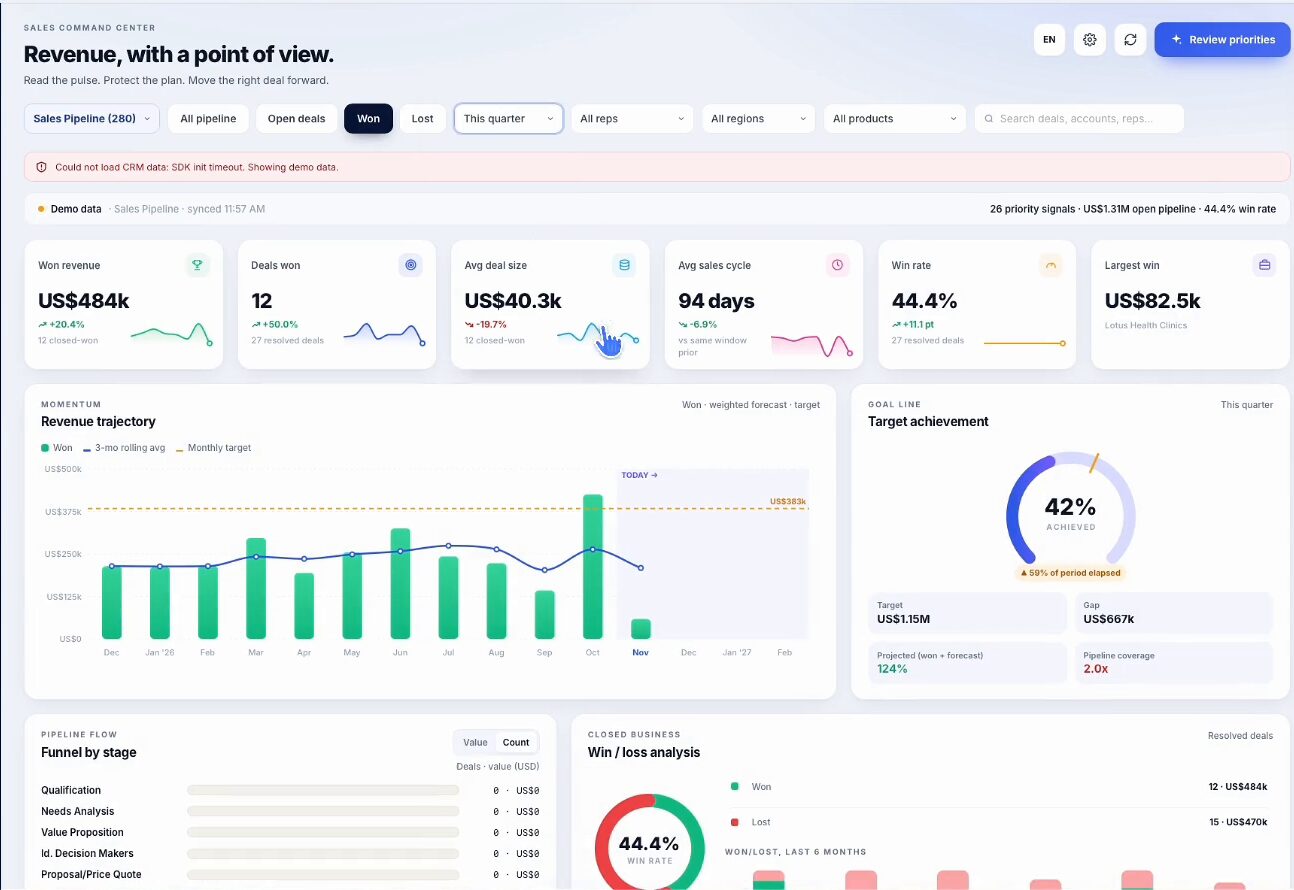
Dùng master prompt miễn phí dưới đây để dựng widget Zoho CRM của riêng bạn: một trung tâm điều hành bán hàng chạy ngay trong CRM. Đây là bản rút gọn, tái sử dụng được của bản mô tả yêu cầu đứng sau Sales Pulse mà chúng tôi xây cùng Claude. Phiên bản đầu tiên của chúng tôi cần một prompt và khoảng 15 phút AI dựng.
Hãy thay toàn bộ nội dung trong [ngoặc vuông] trước khi chạy. Kết quả khác nhau theo mô hình AI và thay đổi khi Zoho cập nhật nền tảng. Đọc các giả định AI liệt kê và test bằng một user quyền thấp trước khi tin bất kỳ con số nào.
Bản đầy đủ gồm bảy màn hình, bộ tính hoa hồng và quy tắc thiết kế được gửi theo yêu cầu.
Mục lục
Vì sao nên dựng widget Zoho CRM bằng AI?
CRM của bạn vốn đã là một nền tảng ứng dụng. Widget Zoho CRM chạy bên trong nó, nên đăng nhập và tài khoản CRM đã có sẵn. Khi Zoho host file, bạn không phải dựng server. Việc chính của AI là viết màn hình.
Tài liệu Zoho Developer mô tả JavaScript SDK làm việc với dữ liệu theo ngữ cảnh của user đang đăng nhập. Hãy coi đó là điểm khởi đầu tốt, chưa phải kiểm toán bảo mật. Code widget vẫn cần được review và test phân quyền.
Chúng tôi thiết kế bản mô tả Sales Pulse để trưởng nhóm bán hàng trả lời ba câu hỏi trong chưa đầy một phút:
- Kế hoạch đang rủi ro ở đâu?
- Ai cần được kèm cặp?
- Tuần này nên làm gì trước?
Widget Zoho CRM hay Vibe: chọn hướng nào?
Chọn widget nếu bạn muốn sở hữu code và tự cố định quy tắc. Thử Vibe nếu bạn muốn công cụ tạo ứng dụng từ prompt ngay trong CRM. Zoho công bố Vibe ngày 23/11/2026.
| Tình huống của bạn | Hướng nên thử trước | Kiểm tra trước khi bắt đầu |
|---|---|---|
| Cần quy tắc số liệu chính xác và code mang đi được | Widget Zoho CRM tạo bằng Claude hoặc trợ lý AI khác | Widget được ghi trong tài liệu cho Professional, Enterprise và Ultimate |
| Muốn có màn hình chạy được mà không phải xử lý file | Vibe | Enterprise, Ultimate, Zoho One Enterprise hoặc CRM Plus |
| Yêu cầu còn chưa rõ | Làm prototype màn hình trước, rồi chốt quy tắc trong prompt widget | Thời gian dựng lại, vì hai kết quả tách biệt |
| Biểu đồ chuẩn đã trả lời được câu hỏi | Report và dashboard có sẵn của CRM | Không có code phải bảo trì |
Vibe còn mới, hãy kiểm tra quyền truy cập trong chính tài khoản của bạn. Thông báo trên cộng đồng Zoho mô tả việc triển khai theo giai đoạn, bắt đầu từ data center US, IN và EU. Thông báo cũng cho biết bản đầu chỉ tạo Tabs và yêu cầu quyền Manage Extensibility. Các chi tiết này được kiểm tra ngày 26/11/2026.
Cần chuẩn bị gì trước khi copy prompt
- Phiên bản Zoho CRM hỗ trợ widget, đã bật Developer Permissions trong profile của bạn.
- Tên pipeline chính và đơn vị tiền tệ báo cáo.
- Dữ liệu deal sạch: stage, amount, probability và closing date. Xem hướng dẫn chuẩn bị dữ liệu trước khi dùng CRM.
- Một user test quyền thấp.
- Một trợ lý AI tạo được file và gói zip.
Vòng lặp 6 bước dựng widget Zoho CRM
Vòng lặp biến một prompt thành công cụ bạn kiểm tra được. Đừng bỏ bước 5, vì biểu đồ đẹp vẫn có thể sai.
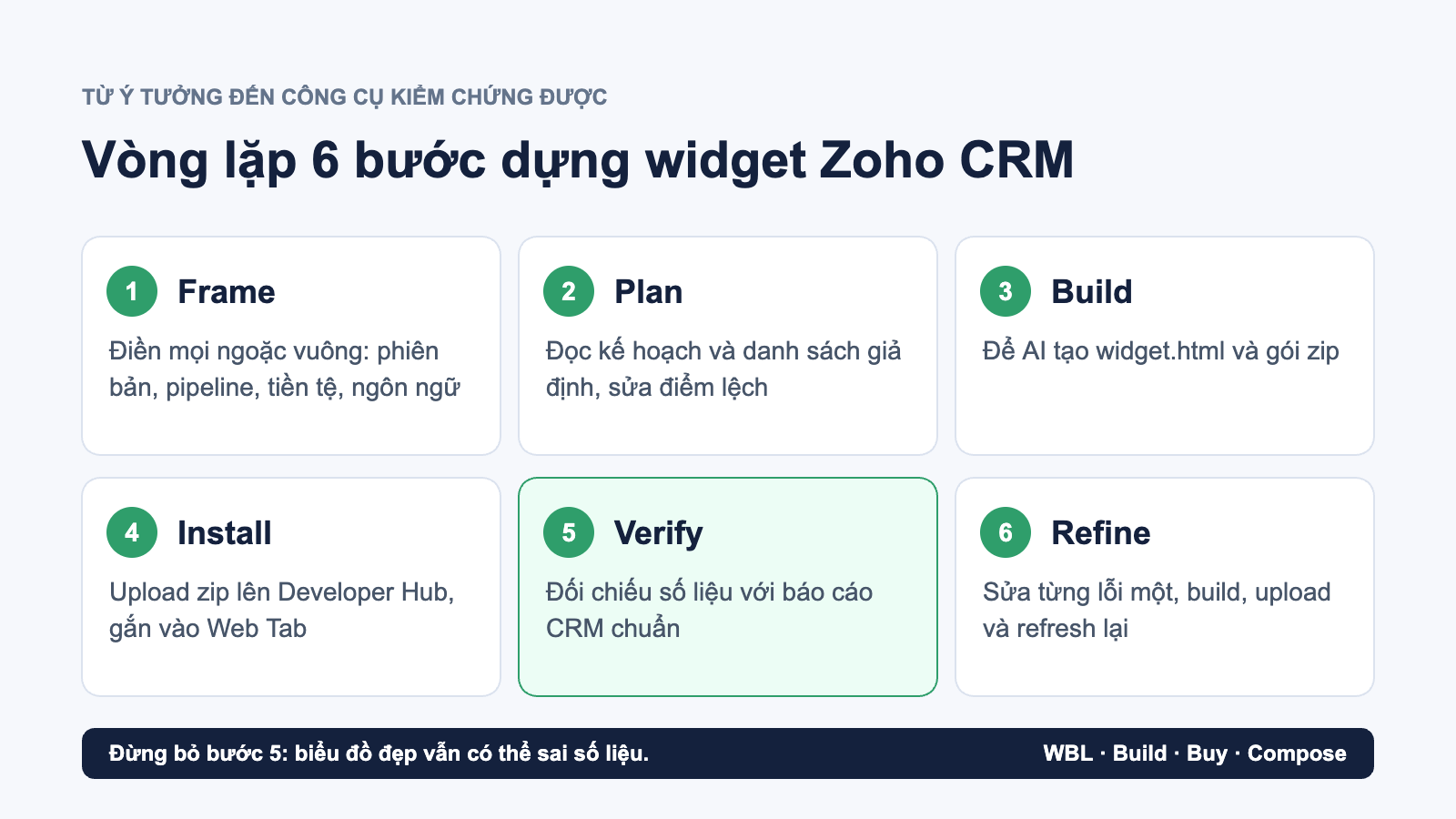
- Frame. Điền mọi ngoặc vuông: phiên bản, pipeline, tiền tệ và ngôn ngữ.
- Plan. Đọc kế hoạch ngắn và danh sách giả định. Sửa mọi điểm không khớp với CRM của bạn.
- Build. Để AI tạo
widget.htmlvà gói zip. Yêu cầu xem danh sách file trong zip. - Install. Upload zip lên Developer Hub và gắn widget vào một Web Tab.
- Verify. Đối chiếu tổng số với report chuẩn của CRM, cùng bộ lọc và ngày.
- Refine. Báo từng lỗi một, build lại, upload lại và hard refresh.
Lưu lại từng phiên bản file. Khi một thay đổi làm sai số liệu, bạn so được với bản tốt gần nhất.
Quy tắc số liệu giữ cho dashboard Zoho CRM trung thực
Phần lớn tranh cãi về dashboard bắt đầu từ định nghĩa, nên hãy ghi chúng vào prompt trước lần dựng đầu tiên. Các quy tắc sau quyết định widget đếm pipeline của bạn ra sao.
| Chỉ số hoặc trường hợp | Quy tắc trong prompt | Vì sao quan trọng |
|---|---|---|
| Trạng thái deal | Đọc forecast_type từ picklist Stage, không dựa vào tên stage | Tên stage khác nhau giữa pipeline và đội |
| Stage tạm hoãn | Giữ là Open và hiển thị thành dải riêng | Deal đứng yên vẫn nhìn thấy mà không đổi logic CRM |
| Weighted forecast | Amount x Probability, chỉ tính deal Open | Deal đã đóng không thổi phồng dự báo |
| Thiếu Amount | Tính là 0 và gắn cờ “Missing value” | Lỗ hổng dữ liệu hiện ra thay vì biến mất |
| Lọc theo kỳ | Dùng Closing_Date | Mọi màn hình trả lời cho cùng một kỳ |
| Mẫu nhỏ | So sánh dưới 5 deal phải ghi là ít dữ liệu | Phần trăm lớn trên hai deal gây hiểu sai |
Bản đầy đủ còn có quy tắc cho ngày gia hạn và hoa hồng. Chúng phụ thuộc chính sách bán hàng của bạn, hãy thống nhất với Finance trước khi ai đó dựng.
Master prompt: copy, chỉnh và chạy
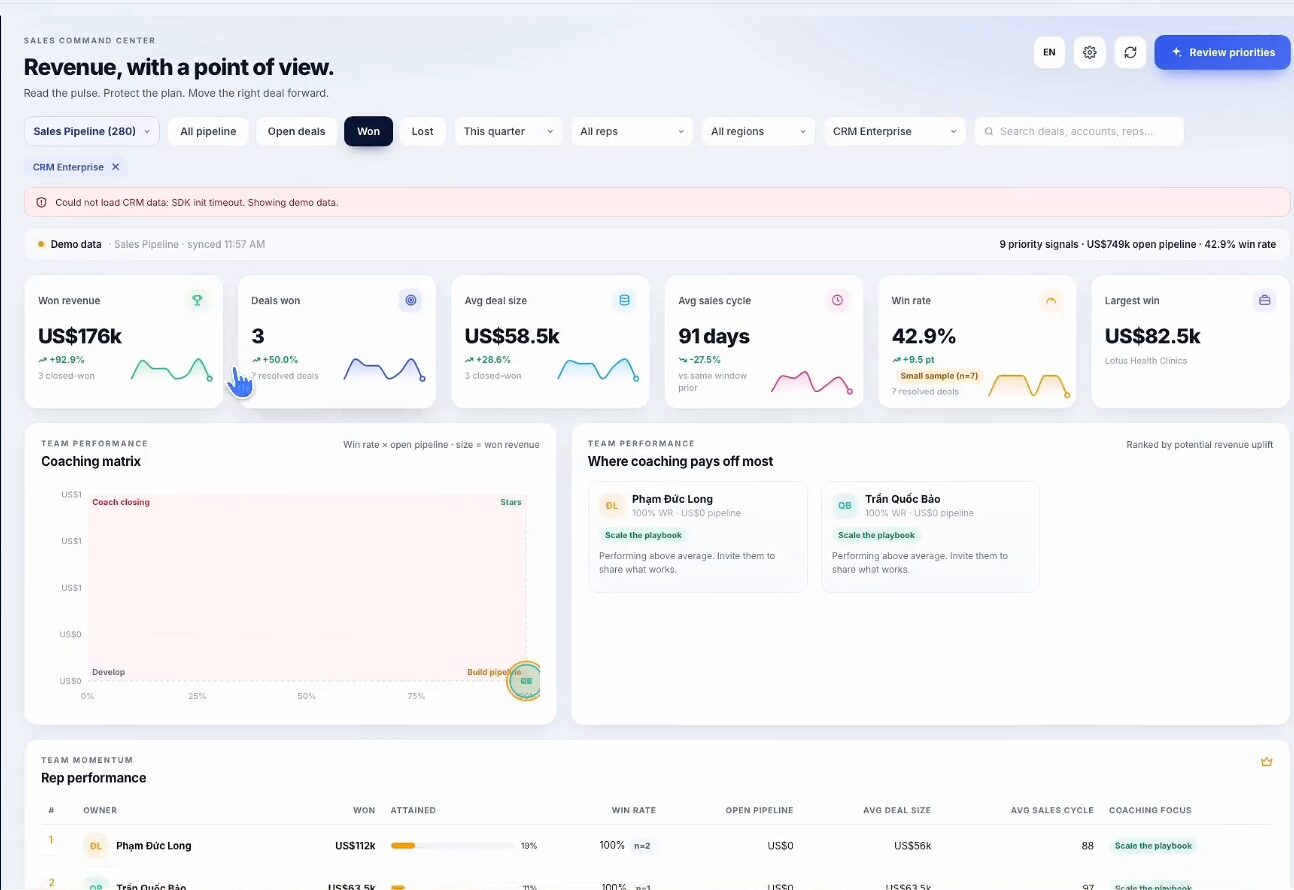
Dán master prompt này vào trợ lý AI để tạo widget Zoho CRM. Bản rút gọn gồm ba màn hình: Overview, Pipeline và Team. Prompt được giữ nguyên tiếng Anh, còn ngôn ngữ giao diện do bạn chọn trong ngoặc vuông.
# WBL Sales Pulse: Master Prompt (one prompt -> one Zoho CRM Widget)

## 0. ROLE AND GOAL
You are a senior Zoho CRM solution architect and front-end engineer.
Build "Sales Pulse": a sales command center that runs as a Zoho CRM Widget inside a Web Tab, reads CRM data through the official Zoho Embedded App JS SDK, and helps a sales leader answer three questions in under a minute: Where is the plan at risk? Who needs coaching? What should we do first this week?
Work in ONE pass. Do not ask me questions. If something is unclear, choose the most reasonable assumption, list every assumption in a comment block at the top of the file, and continue.

## 1. CONTEXT
- CRM: Zoho CRM ([EDITION, e.g. Zoho One / Enterprise]). Modules used: Deals, Accounts, Contacts, Notes, Users.
- Main pipeline: [PIPELINE NAME]. Stage picklist values are pipeline-specific: read them from field metadata, never hardcode.
- Currency: [USD]; secondary display [VND] at configurable rate [25900].
- Users: sales reps, sales managers, CEO. UI language: Vietnamese by default, English toggle (EN / VI) for every label.
- The widget must work in two modes: live (inside Zoho CRM) and demo (opened as a plain file, no SDK).

## 2. DELIVERABLES
1. widget.html: ONE self-contained file (inline CSS and JS). The only external dependency is the official Zoho Embedded App JS SDK (put its URL in a single constant at the top; use the URL from Zoho's current documentation).
2. sales-pulse-widget.zip built with a script, with this exact structure (do NOT use `zet pack`):
   - the same page at /widget.html, /index.html, /app/widget.html, /app/index.html
   - explicit directory entries in the zip
   - /plugin-manifest.json containing {"service":"CRM"}
   - /app/translations/en.json
3. After building, list the zip contents and verify the four page paths exist. Show the listing.
4. A short install guide (5 lines): Developer Hub -> Widgets -> upload zip -> Index Page /widget.html -> Setup -> Modules and Fields -> Web Tabs -> attach widget -> hard refresh (Ctrl/Cmd + Shift + R).

## 3. SCREENS (left navigation, 7 views)
1. Overview: filter bar (pipeline selector; All pipeline / Open / Won / Lost; period: this quarter, last quarter, this year, last year, last 6 months, all time; rep; region; product; search). KPI cards with sparkline and delta vs previous period: Won revenue, Deals won, Avg deal size, Avg sales cycle (days), Win rate, Largest win. Then: revenue trajectory (monthly won bars + 3-month rolling average + monthly target line), target achievement gauge (target, gap, projected = won + forecast, pipeline coverage), funnel by stage (value/count toggle), win/loss analysis (donut + top loss reasons), sales intelligence (3 signal cards + priority risk alerts), team leaderboard, sales heatmap (tabs: Region / Industry / Source / Deal type), product performance, highest-value accounts with industry mix.
2. Pipeline: funnel, 12-week close plan (weighted vs value), stage report table (deals, value, weighted, avg probability, avg age, overdue, inactive, no-amount, % of pipeline, largest deal), deal aging, deal list.
3. Accounts: account management console: relationship health (Critical / Watch / Steady), commitment or renewal date, open exposure, attention level (Urgent / Review), risk signal text; filters and sorting.
4. Customer 360: one account profile: info, deals, contacts, notes, related accounts. Click any item to open a detail drawer.
5. Team: coaching matrix (x = win rate, y = open pipeline, bubble size = won revenue; four zones: Stars, Coach closing, Build pipeline, Develop) and "where coaching pays off most" cards; rep performance table.
6. Commission: commission calculator per rep, daily pacing, month and quarter projection.
7. Intelligence: recommended actions, hot deals, risk alerts, all rule-based and explainable (show the rule that fired).
Every list row opens a right-side drawer with key fields, stage progress, a recommended next step, and two buttons: "Open in Zoho CRM" (deep link to the record) and "Customer 360".

## 4. METRIC RULES (must match Zoho CRM exactly)
- Deal status (Open / Won / Lost) comes from the forecast_type of the Stage picklist, matched on the display value that the record returns. Never infer status from stage names.
- A stage whose name contains "On hold" / "Tam hoan" is still Open (as in the CRM). Show it as a separate band. Config flag EXCLUDE_ON_HOLD_FROM_WEIGHTED (default false).
- Weighted forecast = Amount x Probability for Open deals. A deal with no Amount counts as 0 and gets a visible "Missing value" flag. Never hide it.
- Period filters use Closing_Date.
- A delta chip shows "low data in previous period" when the comparison period has fewer than 5 deals.
- Renewal date = most recent won close date + RENEWAL_MONTHS (default 12; 0 disables).
- Commission: tier rate by attainment level AFTER the deal; + size bonus (highest matching band); x deal-type multiplier x accelerator (attainment >= 120%) x personal multiplier; + one-time adjustment. USD thresholds converted at the configured rate. Put tiers, bands and multipliers in a CONFIG object at the top: [TIERS: e.g. <80% = 3%, 80-100% = 4%, >100% = 5%] [SIZE BONUSES] [DEAL-TYPE MULTIPLIERS].

## 5. DATA LAYER (the "one door" rule)
- Create ONE data-access module. No screen calls the SDK or API directly.
- It: initializes the SDK, reads stage metadata, pages through records, requests only the fields needed, caches in memory, normalizes records, and exposes clean functions to the screens.
- If SDK init does not respond within [6] seconds, switch to demo mode automatically and show a clear banner: "Could not load CRM data. Showing demo data."
- Demo mode: generate a realistic but entirely fictional dataset (about 300 deals, 35 accounts, 6 reps, 4 regions, 8 industries, 6 products, several lost reasons, some deals with missing Amount, some On hold, some overdue). Never use real company or person names.

## 6. DESIGN
- Calm, executive look: dark navy sidebar, light content area, white rounded cards, soft borders, generous spacing, one accent green for positive, red for risk, amber for watch.
- Typography: system sans-serif stack; large KPI numbers; small uppercase section labels.
- Charts: draw with inline SVG or canvas (no heavy chart library). Include tooltips, readable axis labels, and a legend whenever there is more than one series.
- Responsive down to a 1280px laptop; sticky filter bar; empty states and loading skeletons for every panel.
- Accessibility: color is never the only signal (add icons or text), contrast >= 4.5:1, keyboard-focusable drawer with Esc to close.

## 7. SECURITY AND QUALITY RULES
- Escape all record text before inserting into HTML. Never put raw CRM values into innerHTML.
- No API keys, tokens, passwords or credentials anywhere in the code.
- No network calls except the Zoho SDK. No eval. No storing customer data in browser storage.
- Handle: no deals, null Closing_Date, null Probability, missing owner, multi-currency, very long names, 10,000+ records (paginate, do not freeze the UI).

## 8. KNOWN PITFALLS (avoid them up front)
- "Page Not Found" after upload = wrong zip structure. Follow section 2 exactly.
- Stage values differ per pipeline: always read from metadata; match on display value.
- The widget may load before the SDK is ready: wait for the ready event, with the timeout fallback above.
- Do not compute dashboards from the first page of records only.
- After re-uploading, the Web Tab keeps the old widget until it is re-selected and the page is hard-refreshed.

## 9. HOW TO WORK
1. Output a 10-line plan: assumptions, field mapping, risks. Then continue immediately.
2. Build widget.html, then the zip with a Python script.
3. Self-review against sections 4, 5, 7, 8. Fix anything that fails, then state what you checked.
4. Finish with: the file paths, the zip listing, the install guide, and the list of assumptions I should confirm.
Điền các ngoặc vuông
| Placeholder | Cần điền | Ví dụ |
|---|---|---|
| [EDITION] | Phiên bản CRM của bạn | Enterprise |
| [PIPELINE NAME] | Đúng tên pipeline hiển thị trong CRM | Standard |
| [CURRENCY] | Tiền tệ báo cáo | USD |
| [SECOND CURRENCY] và [EXCHANGE RATE] | Tiền tệ hiển thị phụ (tùy chọn) và tỷ giá Finance duyệt | VND và tỷ giá đã duyệt |
| [DEFAULT LANGUAGE] và [SECOND LANGUAGE] | Ngôn ngữ giao diện | Vietnamese và English |
| [LOCAL ON-HOLD LABEL] | Cách đội bạn gọi deal tạm dừng | Tạm hoãn |
| [TIMEOUT] | Số giây chờ trước khi chuyển sang demo mode | 6 |
Dòng nào không áp dụng thì xóa đi. Ngoặc vuông bỏ trống sẽ khiến AI tự đoán.
Cách cài đặt widget Zoho CRM
Khi cấu trúc zip đã đúng, cài đặt chỉ mất vài thao tác. Tên menu có thể khác đôi chút giữa các tài khoản và phiên bản.
- Mở Setup, vào Developer Hub, chọn Widgets. Tạo widget với Zoho hosting.
- Upload
sales-pulse-widget.zipvà đặt Index Page là/widget.html. - Vào Setup, Modules and Fields, rồi Web Tabs.
- Tạo Web Tab, gắn widget và kiểm tra user nào được thấy.
- Mở tab và hard refresh bằng Ctrl + Shift + R, hoặc Cmd + Shift + R trên Mac.
Sửa lỗi “Page Not Found”
Trong các lần build của chúng tôi, lỗi này đến từ cấu trúc zip khi dùng zet pack. Kiểm tra trang có đủ ở cả bốn đường dẫn nêu trong prompt. Sau khi upload mới, chọn lại widget trong Web Tab và hard refresh.
Vẫn chưa được? Mở Base URL của widget kèm /widget.html ở tab trình duyệt mới. Nếu trang tải được, kiểm tra Web Tab. Nếu không, xóa widget, tạo lại và upload zip.
Kiểm tra dashboard Zoho CRM trước khi tin số liệu
Widget Zoho CRM chỉ sẵn sàng khi số của nó khớp với CRM. Chạy các bước sau và ghi lại mọi chênh lệch.
- Banner demo: chắc chắn màn hình đang hiện dữ liệu thật, không phải bộ demo hư cấu.
- Won revenue: so với report CRM cùng pipeline và cùng kỳ theo Closing Date.
- Deal đang mở: khớp số lượng, gồm cả deal tạm hoãn.
- Thiếu Amount: mở ba deal bị gắn cờ và xác nhận trường đang trống.
- Phân trang: xác nhận tổng số tính nhiều hơn trang record đầu tiên.
- Phân quyền: đăng nhập bằng user quyền thấp, kiểm tra record ẩn vẫn ẩn.
- Review code: tìm trong file các địa chỉ web bên ngoài, dữ liệu được lưu và text record thô trong
innerHTML.
Dữ liệu lớn còn chịu giới hạn API của Zoho CRM. Credit mỗi ngày phụ thuộc phiên bản và số license. Hãy xác nhận cách tính lượt gọi SDK của widget trước khi triển khai rộng.
Năm sai lầm cần tránh với widget Zoho CRM
Phần lớn vấn đề đến từ quy trình, không phải từ code.
- Đòi mọi thứ một lúc. Bắt đầu với ba màn hình. Chỉ thêm khi số liệu đã khớp.
- Tin vào dữ liệu demo. Demo đẹp chứng minh bố cục, không chứng minh logic pipeline của bạn.
- So sánh khác bộ lọc. Dashboard và report có thể lệch chỉ vì khác ngày hoặc pipeline.
- Chia sẻ tab quá sớm. Test widget Zoho CRM bằng user quyền thấp trước.
- Đổi nhiều thứ cùng lúc. Mỗi lần build một thay đổi để biết cái gì gây lỗi.
Chỉ định một người chịu trách nhiệm cho quy tắc số liệu. Khi Sales và Finance định nghĩa “won revenue” khác nhau, không master prompt nào phân xử thay được.
Câu hỏi thường gặp về widget Zoho CRM
Không biết code có dựng được widget Zoho CRM không?
Trợ lý AI có thể viết code. Bạn vẫn cần điền prompt, cài file và kiểm tra kết quả. Nếu không muốn xử lý file, hãy xem Vibe ở phiên bản đủ điều kiện.
Phiên bản nào hỗ trợ widget Zoho CRM?
Tài liệu widget của Zoho liệt kê Professional, Enterprise và Ultimate. Profile dùng widget cần Developer Permissions. Hãy xem trang hiện hành trước khi lên kế hoạch triển khai.
Dựng mất bao lâu?
Phiên bản Sales Pulse đầu tiên của chúng tôi mất khoảng 15 phút AI dựng. Điền ngoặc vuông, cài đặt và đối chiếu số liệu cần thêm thời gian. Kết quả phụ thuộc mô hình, dữ liệu và độ rõ ràng của quy tắc.
Dùng prompt này dữ liệu CRM có an toàn không?
Prompt chứa quy tắc, không chứa record khách hàng, nên bạn không cần dán dữ liệu CRM vào AI. Prompt cũng cấm gọi mạng ra ngoài, key và lưu trữ trên trình duyệt. AI vẫn có thể bỏ sót, hãy review code và test phân quyền.
Master prompt có cho mọi người cùng một widget không?
Không. Bố cục, chất lượng code và giả định khác nhau giữa các mô hình và giữa các lần chạy. Zoho cũng cập nhật nền tảng. Hãy coi kết quả là bản nháp cho đến khi vượt qua các bước kiểm tra.
Nhận bản đầy đủ master prompt Sales Pulse
Bản đầy đủ mở rộng widget Zoho CRM này thành bảy màn hình: Overview, Pipeline, Accounts, Customer 360, Team, Commission và Intelligence, kèm bộ tính hoa hồng và quy tắc thiết kế.
Cần hỗ trợ nhiều hơn một prompt? WBL Consulting Group là Authorized Zoho Partner tại Việt Nam. Xem cách chúng tôi làm việc với hệ sinh thái Zoho. Tiếp theo, chúng tôi đang chuẩn bị chuỗi ba bài về Build, Buy, Compose.