











Prepare Data Before Using CRM is a step that many SMEs tend to overlook. Many businesses think that simply choosing software, importing a customer list and starting to use it is enough. But if data is scattered across multiple Excel files, each employee stores information differently, or the data contains duplicates and inconsistencies, moving everything into a CRM will only transfer the old problems into a new system.
Therefore, before implementing a CRM, businesses need to review their existing data, how information is organized and how data is used throughout the sales process. There is no need to build a complex system from the beginning. What matters is knowing which data actually needs to be kept, which information needs to be standardized and how the data will move through each stage.

Prepare Data Before Using CRM: Where Should You Start?
Before moving data into a CRM, businesses should first check where their customer information is currently stored. It may be in Excel, Google Sheets, an old software system, email or separate lists maintained by individual Sales representatives.
When these sources are brought together, businesses will often discover very familiar problems: the same customer appears multiple times, phone numbers or email addresses are missing, company names are written inconsistently, or customers who have not interacted with the business for a long time are still included in the current database.
If this data is imported directly into the CRM, the system will continue to contain duplicate records and inaccurate information. Sales may have difficulty finding customers, while managers may struggle to obtain a reliable picture of the actual customer base.
Therefore, the first step is not to put as much data into the CRM as possible, but to identify what data currently exists and determine its quality.
Clean the Data Before Uploading It to the System
After reviewing the existing data, Prepare Your Data Before Using CRM should begin with cleaning the information that will actually be used.
This can start with simple issues such as removing duplicate records, checking for missing contact information, standardizing customer and company names, and removing data that no longer has practical value.
For example, the same customer may appear in three different files. If this is not resolved beforehand, importing the data into the CRM can easily create three separate profiles. As a result, customer communication history and sales opportunities may become fragmented, making it difficult for Sales to determine which information is accurate.
Businesses should also standardize how important information such as phone numbers, email addresses, lead sources and opportunity statuses are entered. There is no need to make the process overly complicated; having one consistent format is enough to prevent multiple versions of the same information from continuing to appear in the future.

Clean data does not mean perfect data. Clean data means data that is accurate enough, clear enough and usable for the work.
Not All Data Needs to Be Moved into the CRM
Another common issue is that businesses want to move all historical data into the system because they believe that “if we already have it, we should keep it.”
But a large database does not necessarily mean a good database.
Businesses should first classify the data groups that are actually necessary for current operations. For example, active customers, leads, ongoing opportunities or former customers that still have reference value may be retained. On the other hand, records with too much missing information, duplicates or data that is no longer relevant can be considered for removal or separate archiving.
This approach helps the CRM focus on valuable data instead of becoming a place where every piece of information the business has ever collected is stored.
More importantly, classification also makes the system easier for Sales to use immediately after implementation. When opening the CRM, employees can see the customers and opportunities that actually require attention instead of having to filter through a large amount of outdated data.
Clearly Define Where Each Type of Information Belongs
Once the data has been cleaned, businesses need to establish a clear information structure within the CRM. This is an important part of Prepare Your Data Before Using CRM, because the clearer the structure, the fewer inconsistencies will occur when data is moved into the system.
A customer may have many different types of information: contact person, company, needs, communication history and sales opportunities. If there are no clear rules defining where each type of information belongs, Sales can easily enter the same data in multiple places or create their own management methods.
For example, information about an individual contact should be managed in the Contact record, company information should belong to the Company, while a specific sales opportunity should be tracked in the Pipeline. This structure creates clear relationships between data instead of turning everything into disconnected information tables.
Businesses should also avoid creating too many fields simply because the CRM allows them to. Every information field should have a specific purpose: what is it used for, who needs it and is it actually necessary for customer management?
If a field does not support tracking, classification or decision-making, businesses should consider whether it needs to be included in the system from the beginning.
Data Must Work Together With the Process
Prepare Your Data Before Using CRM is not just about organizing columns in Excel. Businesses also need to determine which stages the information will pass through during the sales process.
For example, a lead comes from the website. Sales receives the information, contacts the lead to understand their needs, provides consultation, sends a quotation and continues following up until an outcome is reached. At each stage, new information is created and updated in the CRM.
If this flow is not defined in advance, Sales may continue working the old way: the customer is entered into the CRM, but consultation history remains in another file, the quotation stays in email and the next step is simply remembered by the employee.
In that case, the CRM may contain a lot of data but still fail to show where the customer is and what needs to happen next.
Therefore, before implementation, businesses only need to clearly answer a simple sequence of questions:
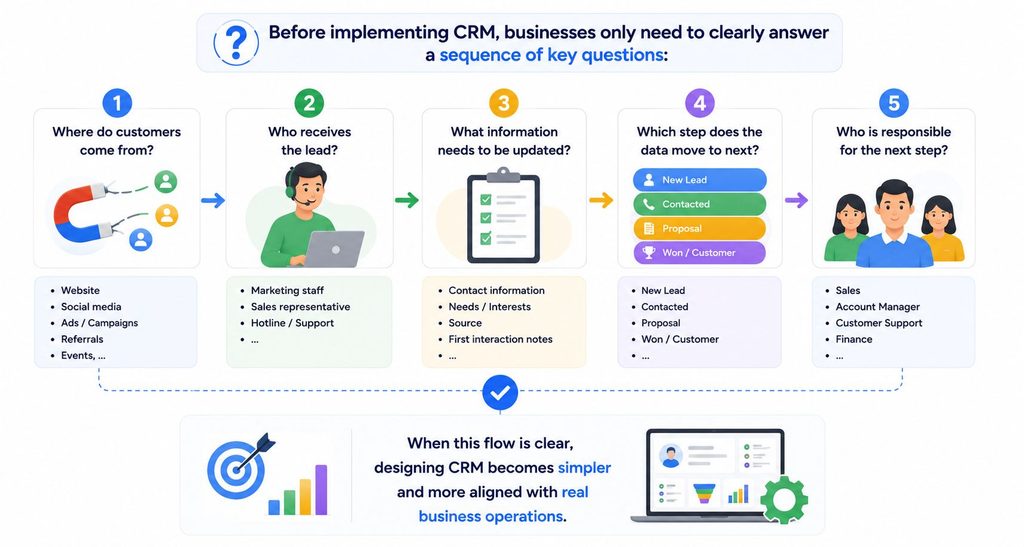
When this flow is clear, designing the CRM becomes simpler and more closely aligned with actual operations.
Do Not Turn Your CRM into Another Version of Excel
This is something SMEs should pay particular attention to.
If the current Excel file has 20 columns, it does not mean the CRM also needs 20 fields. If Sales currently uses different statuses such as “in consultation,” “waiting for customer,” “quotation sent,” “follow-up,” or “waiting for response,” the business should not simply copy these terms into the system.
Before moving to a CRM, businesses should review which information is actually necessary and which statuses have the same meaning. The goal is not to copy the old way of working exactly, but to retain valuable information and simplify the way it is managed.
A CRM only becomes useful when employees can understand the system and use it consistently. If the structure is too complicated, Sales may easily return to Excel or personal tools to get their work done.
Check the Data Before and After Migration
Once the structure has been standardized, the business can move the data into the CRM.
At this stage, each column of the old data needs to be mapped to the corresponding field in the system. A sample dataset should be tested before importing the entire database to identify formatting errors or missing information.
After migration, the business should also check the number of customers, companies and opportunities; verify that important information has been placed in the correct fields and confirm that related data has been linked correctly.
Do not consider an “import successful” message as the end of the process. Data is only truly ready when Sales can open a record, understand the information and continue working without having to return to the old system to find missing data.
Good Data Preparation Makes CRM Easier to Implement
For SMEs, Prepare Data Before Using CRM does not need to become a complex technology project. Businesses only need to do three things well: clean up the existing data, standardize how information is organized and determine how the data will be used throughout the sales process.
When Prepare Your Data Before Using CRM is handled clearly, businesses can more easily select information fields, design the Pipeline, migrate data and train Sales teams to use the system. More importantly, the CRM after implementation will reflect how the business actually operates instead of becoming another place to store more data.
This is also how WBLGroup approaches CRM implementation: not by starting with how many features the software has, but by understanding how the business currently manages its data and what problems the system actually needs to solve.
Because an effective CRM does not start with a huge database. It starts with clear, structured data that is placed into the right process.